
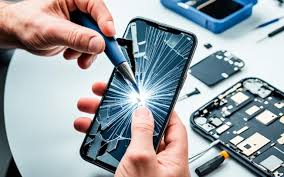
In today’s fast-paced digital world, smartphones have become an essential part of our daily lives. From staying connected with friends and family to managing work tasks and entertainment, we rely heavily on our devices. However, constant usage can lead to wear and tear, resulting in common issues like cracked screens, battery problems, and software glitches. Instead of immediately replacing your phone, quick mobile repairs can significantly extend its lifespan, saving both money and resources. In this article, we’ll explore practical repair strategies and tips to help your phone stay in top condition for years to come.
1. Addressing Battery Issues Promptly
One of the most common reasons smartphones lose their functionality over time is battery degradation. A failing battery can cause unexpected shutdowns, slow performance, or even swelling that damages the device.
Quick Repairs for Battery Problems:
- Battery Replacement: Replacing an old or malfunctioning battery with a new, compatible one is often a simple procedure that breathes new life into your phone.
- Proper Charging Habits: Avoid overcharging your phone, and unplug it when it reaches 100%. Also, try to maintain your battery level between 20% and 80% for optimal longevity.
- Use Quality Chargers: Using certified chargers prevents voltage fluctuations that can damage the battery.
By addressing battery issues early, you not only restore your phone’s performance but also prevent long-term damage to internal components.
2. Fixing Cracked Screens Quickly
A cracked screen is not just an aesthetic issue; it can affect touchscreen sensitivity and potentially expose internal components to dust and moisture.
Quick Repairs for Screen Damage:
- Screen Replacement: Professional screen replacement is often quicker and more affordable than replacing the entire phone. Many repair shops can perform the procedure in under an hour.
- Protective Measures: Using tempered glass screen protectors after repair can prevent future cracks. A sturdy case also reduces the risk of damage from accidental drops.
Investing in quick screen repairs can save you from further costly damages, such as LCD or motherboard issues.
3. Resolving Charging Port Problems
Loose or malfunctioning charging ports are common issues, especially for devices that are frequently plugged in. This can lead to slow charging, intermittent connection, or total charging failure.
Quick Repairs for Charging Ports:
- Cleaning the Port: Dust and debris often accumulate in the charging port. Gently cleaning it with compressed air or a soft brush can restore proper connectivity.
- Port Replacement: If cleaning doesn’t help, a professional replacement of the charging port is a quick solution that restores full functionality.
Keeping your charging port in good condition ensures efficient power transfer and prolongs your battery’s health.
4. Repairing Water Damage
Accidental spills or exposure to moisture can severely affect your phone’s performance. Water damage can cause corrosion, short circuits, or permanent hardware failure if not addressed promptly.
Quick Repairs for Water Damage:
- Immediate Power-Off: Turn off your phone immediately to prevent short circuits.
- Professional Drying: Taking your phone to a repair specialist who can clean and dry internal components is crucial. Avoid DIY methods like rice, which are often ineffective.
- Component Replacement: In severe cases, damaged components like the motherboard or battery may need replacing.
Quick action is key to minimizing damage from water exposure and extending the device’s lifespan.
5. Solving Software Glitches and Performance Issues
Not all smartphone problems are hardware-related. Over time, apps, system updates, or malware can slow down your device.
Quick Repairs for Software Problems:
- Software Updates: Regular updates fix bugs, improve security, and enhance performance.
- App Management: Uninstall unused apps, clear cache, and limit background processes to free up resources.
- Factory Reset: As a last resort, a factory reset can restore your phone to optimal performance, but ensure data backup before proceeding.
Maintaining software health ensures smooth operation and reduces the likelihood of hardware stress caused by overworked components.
6. Replacing Damaged Buttons and Speakers
Buttons, speakers, and microphones are often overlooked but essential for everyday use. Non-responsive buttons or muffled audio can diminish your smartphone experience.
Quick Repairs for Buttons and Speakers:
- Button Replacement: Repairing or replacing malfunctioning buttons like volume, power, or home buttons can be done quickly by professionals.
- Speaker Cleaning or Replacement: Dust and moisture can block speakers. Cleaning or replacing them restores sound clarity.
These repairs may seem minor but significantly improve usability and prevent further complications.
7. Protecting Against Future Damage
Preventive care is just as important as repairs. Implementing protective measures can extend your phone’s lifespan and reduce the frequency of repairs.
Preventive Tips:
- Use Protective Cases and Screen Guards: They absorb impact from accidental drops.
- Avoid Extreme Temperatures: Excessive heat or cold can damage battery life and internal components.
- Regular Maintenance: Periodically check your phone for software updates, clean ports, and inspect for cracks or wear.
Preventive actions combined with quick repairs create a long-lasting, reliable smartphone.
Conclusion
Smartphones are indispensable, and their longevity depends on timely care and repairs. Quick mobile repairs—from battery replacement to screen and port fixes—can dramatically extend your phone’s life, saving both money and environmental resources. Don’t wait for minor issues to escalate into major problems; address them promptly to maintain performance, reliability, and value. By combining proper maintenance, preventive measures, and professional repairs, your smartphone can remain a trusted companion for years to come.
SEO Keywords Integrated:
- Quick mobile repairs
- Extend your phone’s lifespan
- Smartphone battery replacement
- Screen repair for mobile phones
- Charging port issues
- Water damage repair
- Smartphone software fixes
If you want, I can also create a version optimized for blog SEO with headings, meta description, and FAQs that would likely rank higher on Google. That could be a nice complement to this 1000-word article. Do you want me to do that next?