
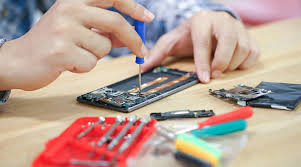
In today’s fast-paced world, our smartphones are more than just communication tools—they are lifelines. From managing work emails to capturing precious moments, a malfunctioning phone can disrupt our daily routine. While professional repair services are always an option, sometimes fixing your device at home is quicker, cost-effective, and convenient. However, DIY mobile repair requires caution, the right tools, and proper techniques to avoid causing further damage. This guide provides essential tips for safely repairing your phone at home.
Why Consider DIY Mobile Repair?
Before diving into DIY mobile repair, it’s important to understand why it might be a good choice:
- Cost Savings: Professional repairs can be expensive, especially for premium devices. DIY fixes often cost only a fraction of professional services.
- Convenience: You can repair your phone at your own schedule without waiting for appointments or shipping.
- Learning Opportunity: Understanding your phone’s inner workings helps you troubleshoot future issues with ease.
However, DIY repair is not risk-free. Careless handling can damage delicate components or void your warranty. The key is to follow safe and systematic methods.
Essential Tools for DIY Mobile Repair
Having the right tools is critical for safe and successful repairs. Common tools include:
- Precision Screwdriver Set: Phones have tiny screws that require specialized screwdrivers.
- Plastic Pry Tools: These help open your phone without scratching or damaging the casing.
- Tweezers: Useful for handling small components like connectors and screws.
- Suction Cups: Help remove screens safely without cracking them.
- Spudgers: Ideal for separating delicate internal components.
- ESD-Safe Mat and Wrist Strap: Protects your phone from static electricity damage.
Investing in quality tools makes repairs easier and reduces the risk of accidental damage.
Common DIY Mobile Repairs
Here are some common issues that you can attempt to fix at home with the right precautions:
1. Replacing a Broken Screen
A cracked or unresponsive screen is one of the most frequent smartphone problems.
Tips for Safe Replacement:
- Power off your device completely before starting.
- Use a suction cup to lift the screen gently.
- Avoid using metal tools on the display; plastic pry tools are safer.
- Take note of screw placement—some screws are different sizes and must return to the same position.
- Purchase high-quality replacement screens that match your phone model.
2. Replacing a Battery
Batteries degrade over time, causing poor performance or sudden shutdowns. Replacing the battery can restore your phone’s life.
Safety Guidelines:
- Always use an original or certified replacement battery.
- Avoid puncturing the old battery—it can leak harmful chemicals or catch fire.
- Disconnect the battery before touching other components.
- Charge the new battery fully before reassembling.
3. Fixing Charging Port Issues
A phone that won’t charge is often due to dust, lint, or a loose charging port.
DIY Steps:
- Use a toothpick or a soft brush to remove debris gently.
- Check for bent pins inside the port.
- If the port is damaged, replacing it may be necessary.
4. Camera Repairs
Blurry or malfunctioning cameras can often be fixed by:
- Cleaning the lens carefully with a microfiber cloth.
- Checking for loose connectors inside the phone.
- Replacing the camera module if cleaning and reconnection don’t work.
General Safety Tips for DIY Mobile Repair
Working with electronics can be risky. To avoid injury or further damage, follow these safety measures:
- Work in a Clean, Well-Lit Area: Prevents losing screws and helps see small components clearly.
- Organize Your Components: Use small containers or magnetic mats to keep screws and parts in order.
- Avoid Using Excessive Force: If a part doesn’t come off easily, double-check for hidden screws or clips.
- Handle Internal Components Carefully: Touching the motherboard or connectors with bare hands can cause static damage.
- Use Proper Replacement Parts: Cheap, incompatible parts can cause more harm than good.
- Backup Your Data: Always backup your phone before starting any repair to prevent data loss.
When to Seek Professional Help
While DIY repairs can be effective, some issues are best handled by experts:
- Severe water damage
- Complex motherboard repairs
- Major software malfunctions
- Phones under warranty (DIY repairs may void it)
Knowing your limits ensures that DIY repair is safe and effective.
Benefits of Learning DIY Mobile Repair
Learning to repair your phone at home isn’t just about saving money—it has several other advantages:
- Skill Development: Understanding phone hardware improves problem-solving skills.
- Immediate Solutions: You won’t have to wait days for professional service.
- Empowerment: Fixing your own devices can boost confidence and independence.
Conclusion
DIY mobile repair is a rewarding and practical solution for common phone problems. With the right tools, careful planning, and attention to safety, you can fix issues like broken screens, dead batteries, or charging port problems at home. Remember to always work systematically, handle components with care, and know when to call in professionals for more complex repairs.
By following these DIY mobile repair tips, you can not only save money but also gain valuable skills while keeping your smartphone in top condition. Taking the safe route ensures that your phone works like new without the stress of expensive repair bills.
SEO Keywords Incorporated:
- DIY mobile repair
- Fix your phone at home
- Safe phone repair tips
- Mobile phone repair
- DIY phone battery replacement
- Screen replacement tips
- Smartphone troubleshooting
If you want, I can also create a catchy meta description and SEO-friendly subheadings to maximize search engine visibility for this article. This will help it rank higher on Google.
Do you want me to do that next?